Showing posts with label internet. Show all posts

Friday, June 9, 2017

Smart TVs can be Hacked just by using Broadcasting Signal

Smart TVs can be Hacked just by using Broadcasting Signal.
Smart TVs can be Hacked just by using Broadcasting Signal
Image Source: 123rf

A Security Researcher warns about a new attack that uses rogue DVB-T (Digital Video Broadcasting — Terrestrial) to hack a wide range of Smart TVs. The Hackers are able to take complete control of a large number of sets at once without having any physical access to any of them.

Even the Hacking tool developed by CIA named "Weeping Angel," which could take over Samsung smart TVs and turn them into spying devices. But this Tool by CIA needed physical access to install Weeping Angel, which made it less likely to be used in mass attacks, and was only feasible if deployed on one target at a time, during carefully-planned operations.

The proof-of-concept exploit for the attack, developed by Rafael Scheel, a security researcher working for Swiss cyber security consulting company Oneconsult, uses a low-cost transmitter for embedding malicious commands into a rogue DVB-T (Digital Video Broadcasting — Terrestrial) signals. 

Scheel says that anyone can set up a custom DVB-T transmitter with equipment priced between $50-$150, and start broadcasting a DVB-T signal.
Smart TVs can be Hacked just by using Broadcasting Signal
Image Source: OneConsult

That signal is then broadcast to nearby devices. It worked against two fully updated TV models made by Samsung. By exploiting two known security flaws in the Web browsers running in the background, and once compromised, attackers could remotely connect to the TV over the Internet using interfaces, allowing them to take complete control of the device.

Once compromised, the TV would be infected in a way that neither device reboots nor factory resets would help the victims get rid of the infection. The attack was able to gain highly privileged root access to the TVs and use the device for all sorts of nasty actions, ranging from DDoS attacks to spying users.

Scheel provided a live hacking demonstration of the attack during a presentation at the European Broadcasting Union (EBU) Media Cyber Security Seminar, saying about 90 percent of the Smart TVs sold in the last years are potential victims of similar attacks.

At the center of Scheel's attack is Hybrid Broadcast Broadband TV (HbbTV), an industry standard supported by most cable providers and smart TV makers that "harmonizes" classic broadcast, IPTV, and broadband delivery systems. TV transmission signal technologies like DVB-T, DVB-C, or IPTV all support HbbTV.

Below you can watch the video of his presentation, which also includes demonstrations for both DVB-T attacks and proposed mitigations :


"Once a hacker has control over the TV of an end user, he can harm the user in a variety of ways," Rafael Scheel, the security consultant who publicly demonstrated the attack, told Ars. "Among many others, the TV could be used to attack further devices in the home network or to spy on the user with the TV's camera and microphone."

Best feature of this  attack is that this Attack is Fully Untraceable, the reason behind this is the DVB-T, the transmission method for HbbTV commands, is a uni-directional signal, meaning data flows from the attacker to the victim only. This makes the attack traceable only if the attacker is caught transmitting the rogue HbbTV signal in real-time. According to Scheel, an attacker can activate his HbbTV transmitter for one minute, deliver the exploit, and then shut it off for good.

It's almost impossible to get rid of infected smart TVs, any backdoors added through this method are almost impossible to remove, as the attacker could sabotage any firmware update mechanism and remain on the device until users got rid of their smart TVs. Furthermore, Scheel says even factory reset operations didn't help for the devices he tested, and the backdoor he developed remained on the TVs.

The researcher says that such a backdoor could be used to run IoT DDoS botnets, use the smart TVs as relay points for attacks on enterprise networks, spy on users via the TV's microphone and camera, steal data stored on the TV, inject ads on the TV (sabotage competitors on the smart TV market), and many other actions.

Once again this hacks underlines the risks of so-called "Internet of Things" devices, the vast majority of which are given network access and computing functionalities without being adequately secured. TVs and other Internet-connected appliances almost universally lack application sandboxing and other exploit mitigations that are a standard part of computer and mobile operating systems. Even worse, most devices run old versions of Linux and open source browsers that contain critical vulnerabilities. While patches are generally available on the Internet for the individual components, manufacturers rarely give customers a way to install them on the devices in a timely way.

Since the IoT devices are rapidly growing and changing the way we use technology, it drastically expands the attack surface, and when viewed from the vantage point of information security, IoT can be frightening.

Due to the insecure implementation, a majority of Internet-connected embedded devices, including Smart TVs, Refrigerators, Microwaves, Security Cameras, and printers, are routinely being hacked and used as weapons in cyber attacks.

So, is there anything to say about this Smart TVs Hacking, Tell us your views in the comment section below. And do share with others too.

Source: OneConsult

Thursday, March 30, 2017

List of Android Smartphones Hiding Pre-Installed Malware

Android Smartphones Hiding Pre-Installed Malware.
http://tecube.blogspot.com/2017/03/android-smartphones-hiding-pre.html

Well, Android devices are often affected by Malware or spyware. Previously, we have heard much news regarding Android malware. However, it looks like some smartphones in India has pre-installed malware.

That means lots of Android devices are already being shipped with pre-installed Malware. Yes, you read that right, Malwares are already present on those Android smartphones even before purchasing.

The risk of pre-installed malware:

As a general rule, users should avoid risky websites and download apps only from official and trusted app stores. However, following these guidelines is not enough to ensure their security. Pre-installed malware compromise the security even of the most careful users. In addition, a user who receives a device already containing malware will not be able to notice any change in the device’s activity which often occur once a malware is installed.

The discovery of the pre-installed malware raises some alarming issues regarding mobile security. Users could receive devices which contain backdoors or are rooted without their knowledge. To protect themselves from regular and pre-installed malware, users should implement advanced security measures capable of identifying and blocking any abnormality in the device’s behavior.

Recently, Check Point Software Technologies have released a report in which they have claimed that almost 36 Android smartphone in India comes pre-installed with malware. 
The report claimed-
The malicious apps were not part of the official ROM supplied by the vendor, and were added somewhere along the supply chain, Six of the malware instances were added by a malicious actor to the device’s ROM using system privileges, meaning they couldn’t be removed by the user and the device had to be re-flashed.

The more shocking part is the report also claimed that since the malware is on the backend, users operating the device won’t even know about the malware’s existence. Well, most of the malware that are developed for Android devices can steal confidential data from users.
Few are them from Ad networks which are intended to push ads frequently. While others are ransomware which locks the devices and demands ransom in return for unlocking the files. 

Here’s the list of affected smartphones: 

  • Galaxy Note 2
  • Samsung Galaxy Note 3
  • Samsung Galaxy Note 4
  • Samsung Galaxy Note Edge
  • Samsung Galaxy Note 5
  • Samsung Galaxy S7
  • Samsung Galaxy S4
  • Samsung Galaxy Note 8.0
  • Samsung Galaxy A5
  • Samsung Galaxy Tab S2
  • Samsung Galaxy Tab 2
  • Xiaomi Mi 4i
  • Xiaomi Redmi
  • ZTE x500
  • Oppo N3
  • Oppo R7 plus
  • Vivo X6 plus
  • Asus Zenfone 2
  • Lenovo S90
  • Lenovo A850
  • LG G4

On it's Website Checkpoint Software Technologies have Listed Malware's name Also.

You can go to their website and check the Malware's name.


If your device is listed above, then you only have one option that is to reflash the ROM. Well, if you know how to do it, then you can do this manually, or else you need to visit your nearest service center of the brand.

Well, this is something companies should look before supplying smartphones to users. 
So, what do you think about this? Share your views in the comment box below.
Share this article with others too and let them know about this issue. 

Sunday, March 26, 2017

How To Undo Sent Email In Your Gmail Account

How To Undo Sent Email In Your Gmail Account.

http://tecube.blogspot.com/2017/03/how-to-undo-sent-email-in-your-gmail.html

Gmail is the enormous mailing network by Google that allows a user to send/receive emails and additionally provide Many more features also. 
On this network more than billions of people are sending and receiving emails daily. 

Sometimes you accidentally or deliberately mail to anyone then, in that case, it appears very embarrassing so at that time, you can cancel the sent mail. Yes, you can cancel the email that you have sent to anyone on Gmail.

Gmail has a feature inbuilt by which you can undo the sent mail within the specific time.
you just have to do some Settings.
Just follow up the below method to cancel a Undo mail on Gmail.

Step 1. First of all login into your Gmail account in which you want to cancel the mail. 
Now at the right top corner, you will see a Gear icon, Click on it and in the drop  down menu Choose setting option.
http://tecube.blogspot.com/2017/03/how-to-undo-sent-email-in-your-gmail.html

Step 2. Now in Setting window under the General Tab, you will find an option of Enable Undo Send.You just Need to select the option of Enable Undo Send. After enabling this option it you will give you the option of “Send cancellation period” Set it to your limit. i.e.5, 10, 20, 30, seconds.
http://tecube.blogspot.com/2017/03/how-to-undo-sent-email-in-your-gmail.html

Step 3. After you had set your time limit you need to save this changes to apply on your Gmail account. 

Step 4. Now Gmail will give you time to undo every email when it is sent, but you can change this time in settings->general->undo send->cancellation period and set it to the maximum of  seconds. 
That’s it every time you send the mail it will display 10-30 seconds to undo the sent email.
http://tecube.blogspot.com/2017/03/how-to-undo-sent-email-in-your-gmail.html


So, this is the method of How To Undo A Sent email in Gmail. By this, you can easily withdraw some sent emails that you actually don’t what to send, in that case this method will be very helpful.

Hope you like the post, don’t forget to share this cool tips with your friends and leave a comment below if you need our help at any step.

Friday, March 24, 2017

Super Mario Run for Android is now available (APK) Download here.

Super Mario Run for Android is now available (APK) Download here.

http://tecube.blogspot.com/2017/03/super-mario-run-for-android-is-now.html
Image Source: Nintendo

Popular auto running video Super Mario Developed by Nintendo is available on android as announced earlier. Read more.

Super Mario Run announced at the iPhone 7 launch event, only promising that the game would be available for Android at some point. Now the game has finally arrived on the Play Store.Now the game has finally arrived on the Play Store. Originally announced on March 23rd.

Super Mario Run on Android is starting on version 2.0, which includes four colored Yoshis as additional playabale characters. The Android version shares the same pricing model as the iOS release - it is free to try, but accessing the whole game will require a one-time purchase of $9.99.

Watch Below Gameplay by Nintendo Mobile:


You can download Super Mario Run from the below links:
Play Store, 
or from APKMirror.

Thursday, March 23, 2017

Windows 10 China Edition Developed by Microsoft

Windows 10 China Edition has been Developed by Microsoft.


http://tecube.blogspot.com/2017/03/windows-10-china-edition-developed-by.html
Windows 10 Red Dragon Edition


To increase its presence in China again after being banned of windows 8 by Chinese Government, Microsoft is reportedly ready with its Windows 10 China edition, or so called Red Dragon Edition.
Windows 8 Banned because China Government claims that there may be hidden backdoors in the operating system.
To do business in China, almost a year ago, Microsoft officials said that they were developing a Windows 10 version in partnership with China Electronics Technology Group Corp. (CETC).
While much details of the new version aren’t known, it’s expected to ditch many applications and features.

According to a report by China Daily, this first version of China-centric Windows 10 edition is now in a good position to serve the local governments and State-owned enterprises.
"We have already developed the first version of the Windows 10 government secure system. It has been tested by three large enterprise customers," Crozier said in an exclusive interview with China Daily in Beijing on Monday.


It should be noted that this version is specially targeted at government and enterprise users with critical needs. On the contrary, Windows 10 is already available to consumers and non-government businesses.
To improve its position in China, Microsoft has partnered with many companies, including deals with Lenovo, Baidu, Xiaomi, and Tencent. With this latest move, Microsoft aims to boost Windows 10 adoption even further.

At the moment, we aren’t sure about the changes that’ll be made to Windows 10 China edition. So, we’ll have to simply wait and watch.

Wednesday, March 22, 2017

Increase Internet Speed Using Command Prompt

How To Increase Internet Speed Using Command Prompt.

http://techntales.blogspot.com/2017/03/increase-internet-speed-using-command.html
How to Increase Internet Speed Using Command Prompt


Whether you are at home or at work, having a fast and efficient Internet connection is a vital component of your daily life. Slow speeds and weak connections can be frustrating and even costly. As more Internet-ready devices make their way into our homes and workplaces, keeping your web speed up is more important than ever.
This article is a step by step procedure on How to increase internet Speed using Command prompt in Windows. I will explain you with four methods.
The tutorial is very easy anyone who has a basic computer knowledge can do this tutorial easily. Do tell us your queries in the comment box.

Requirements:
1. Windows 7, 8,10
2. Little bit Patience

Step 1: Launch Command Prompt as Administrator.
(On Keyboard press Windows Key+X and then click on “Command Prompt (Admin)“.I hope that you have successfully Launched Command Prompt as Administrator).


FIRST METHOD:
Step 1: In command prompt type the following and Hit enter:
ipconfig /flushdns

http://tecube.blogspot.com/2017/03/increase-internet-speed-using-command.html


SECOND METHOD:
Step 1: In command prompt type IP config and hit enter and then copy the default gateway.

http://tecube.blogspot.com/2017/03/increase-internet-speed-using-command.html

Step 2: Now type ping -t (Default Gateway) and hit enter
e.g. :-  my Default Gateway was 123.456.78.910 then I will type ping -t 123.456.78.910. Note After executing the command don’t close the command window, simply minimize it and use the internet

http://tecube.blogspot.com/2017/03/increase-internet-speed-using-command.html


THIRD METHOD:
Step 1: In command prompt type the following and Hit enter:
netsh int ip reset c:\resetlog.txt

http://tecube.blogspot.com/2017/03/increase-internet-speed-using-command.html


FOURTH METHOD:
Type the Following Command and always remember to Hit enter after writing each command

CD/
netsh int tcp set global autotuninglevel=normal
netsh interface tcp show heuristics
netsh interface tcp set heuristics disabled

http://tecube.blogspot.com/2017/03/increase-internet-speed-using-command.html


This article was on How To Increase Internet Speed Using Command Prompt in Windows computer, It is a simple trick with using some parameters, hope you Liked this article.
Comment any queries and do share and let others know.

Tuesday, March 21, 2017

Best Legal WebSites To Download Movies For Free, Legally.


Best Legal WebSites Where You Can Watch and Download Movies For Free, Legally.

http://techntales.blogspot.com/2017/03/10-best-legal-websites-where-you-can.html

Downloading movies and TV shows from an illegal source like torrent websites can often get you in trouble.Google,Bing, Yahoo the world’s biggest search engines also keeps deleting the pirate links from its search results to make the internet a better and safer place form Pirates.
With the advent of streaming services like Netflix, Amazon Prime, HBO etc., watching movies and TV shows in our home has become more comforting than ever. 
Instead of becoming a victim of illegal movie download websites, there are many legal sources that provide free movies and TV shows.
In this Post, I’ll be telling you about the top free movie download websites Legally.
In these websites you can watch hollywood, bollywood and other regional movies for free.


Top 10 Free (And Legal) Movie Download Websites:


If you want free content (not only movies, but also texts, audio and software) head to Internet Archive, the non-profit online digital library.From The Internet Archive, you can download hundreds of movies for free in the form of torrents.
About 4-5 years ago, The Internet Archive just provided direct links and often the movie downloads failed as the file sizes were large.


2. Retrovision:

http://techntales.blogspot.com/2017/03/10-best-legal-websites-to-download.html

Retrovision, another such great free resource which offers great movie downloads. Another bonus point is Retrovision‘s genre-specific menus which make searching for movies very user-friendly. The movies are archived into different popular categories like Adventure, Comedy, Crime, Cartoons, Sci-Fi, Horror, War, Drama, and Westerns. 
The website splits its content into different popular categories like Adventure, Comedy, Crime, Cartoons, Sci-Fi, Horror, War, Drama, and Westerns. If you are looking for all the content at one place, just hit the All Movie List button.


3. MoviesFoundOnline:

http://techntales.blogspot.com/2017/03/10-best-legal-websites-to-download.html

MoviesFoundOnline is a great repository for free movies, independent films, TV shows, stand-up comedy videos etc.. The website hosts free movies ranging from cult classics and short films to documentaries and comedy movies. MoviesFoundOnline doesn’t host or upload any media on its own. It also deletes the movies if they found some copyright issue.


4. YouTube:


http://techntales.blogspot.com/2017/03/10-best-legal-websites-to-download.html

YouTube for its famous video tutorials, unboxing videos, movie trailers, and music albums. But YouTube also is a great repository for Hollywood and Bollywood movies.
There are multiple channels that let you watch movies for free that are that in the public domain. There are some specific movies and TV shows that are YouTube originals and you can enjoy them without paying a penny.
Some popular channels, there’s The Paramount Vault that features a long list of classic feature films.You can find a lot of long lost movies by searching the Best of YouTube Movies.


5.RajShree.com
http://techntales.blogspot.com/2017/03/10-best-legal-websites-to-download.html

Rajshri is one of India’s oldest film studios and they have ventured in a big way into the online video arena. Since their first web premiere of Vivah in 2006, they have brought together wide collection of films and TV shows on Rajshri.com in as many as seven languages (Hindi, Tamil, Telugu, Marathi, Bengali, Punjabi and Gujarati)

This website is for classic Hindi Movies, If you Love to Watch classic Hindi cinemas under Rajshree production then this website is for you.

6. Crackle:

http://techntales.blogspot.com/2017/03/10-best-legal-websites-to-download.html


This Site is owned by Sony. So, naturally, you get lots of movies to watch. You need to do a simple signup, create a watchlist and you’ll be shown recommendations based on your priorities.
Crackle hosts many popular movies and TV shows which you wouldn’t find elsewhere. Crackle offerings include Seinfeld, Firefly, Sports Jeopardy, and many more.


7. Open Culture:

http://techntales.blogspot.com/2017/03/10-best-legal-websites-to-download.html

Open Culture offers high-quality videos from all across the world. It’s a home to free movies, free online courses, and free language lessons. Founded in 2006, it has 6 main sections: Movies, Online courses, Language lessons, e-Books, Textbooks, Audiobooks. Movies section consists of an excellent collection. Currently, it hosts 1,150 free movies online that includes a special collection of Oscar Winning Movies and Charlie Chaplin movies.


8. PopcornFlix:

http://techntales.blogspot.com/2017/03/10-best-legal-websites-to-download.html
The website hosts thousands of free movies spread across multiple categories like drama, action, comedy, horror etc. Here, you’ll also get many free TV shows and full National Geographic series catalog.
This free movie streaming website is owned by Screen Media Ventures. The website offers lots of public domain movies and original content. You can use this website to view content on any type of devices


9. Hulu:

http://techntales.blogspot.com/2017/03/10-best-legal-websites-to-download.html

Hulu is Subscription-based streaming website.You can choose to opt for the free account, which comes with limited content. Here, without any need to download movies, you can stream more than 100 free movies. Apart from the movies, you can also spend some hours watching lots of free TV episodes.


10. MovieZoot:

http://techntales.blogspot.com/2017/03/10-best-legal-websites-to-download.html

Movie Zoot offers Free streaming service that offers “first-rate films of all categories” as well as TV shows.This Website also has well categorized classic movies.Here you can stream thousands of Movies free online.

11. Classic Cinema Online:

http://techntales.blogspot.com/2017/03/10-best-legal-websites-to-download.html

If you are a fan of classic cinema, Classic Cinema Online is going to become your new best friend. This free movie download website hosts classics like Bye Bye Birdie, Mobey Dick, Lone Ranger and more.
Using its helpful sorting by category feature, Anyone can look for the content that suits him/her.


12. Public Domain Torrents:


This free movie download website is a home to a number of old and classic movies. Here, movies are available in multiple formats and you can download them according to your need.
It is probably the only no-notorious-activity torrent website, for Downloading Free Movie Legally.


Nokia 6 Survives Scratch, Burn, And BEND test - Video.

Nokia 6 Survives Durability Test.

Scratch, Burn, And BEND test - Video.


Well, we all Know feature phones of Nokia was very durable. We can take the example of Nokia 3310 which survived a war and washing machine but still working well. 

Nokia had announced three phones in MWC event this year, one of them is Nokia 6 which is made by HMD Global.
Nokia 6 has been crafted using 6000 series aluminum.

The durability of Nokia 6 has  been tested by one of the popular Youtuber JerryRigEverything. The channel posted a video of Nokia 6 subjected to different types of tests, including Scratched it, Burn test and bended it and it is still, fine.
And, Nokia 6 had successfully survived the durability tests like bends, scratch and burn test. It also made the Youtuber astonished with its solid build. Watch the Video Below.

Scratch Test:

Nokia 6 Survives  Scratch, Burn, And BEND test - Video.

The first was the scratch test, well Nokia 6 comes up with the scratch proof fingerprint scanner and front and rear camera sensors are also scratch resistant. The phone survived the scratch test pretty well.

Burn Test:


The next test come in the list is burn test, Nokia 6 carries a 5.5-inch FHD 1080p IPS display. Well, the Youtuber pointed the flames toward the screen. The IPS display recovered the pixels that turned out black after subjecting a part of the screen to flames.

Bend Test:

Nokia 6 Survives  Scratch, Burn, And BEND test - Video.

Nokia 6 even survived the bend test. YouTuber tried to bend the phone by giving outside forces. You will be shocked to know that Nokia 6 doesn’t bend even to the slightest extent.

At the end of the video, the Youtuber claimed that Nokia 6 is one of the most durable and solid phone this year. You can watch the video below.
Video credits : Youtuber JerryRigEverything.


Nokia 6 durability Test video


So, What do yu think About this New Nokia 6 phone. Share your review in Comment.


Sunday, March 19, 2017

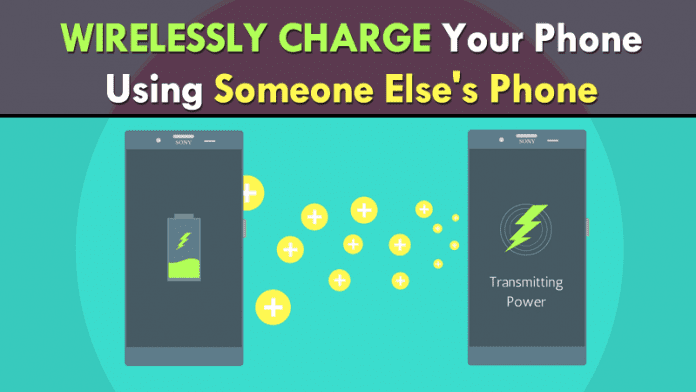
Charge Your Phone Using Someone Else’s Phone

Soon You Can Wirelessly Charge Your Phone Using your Friend’s Phone.

http://tecube.blogspot.com/2017/03/charge-your-phone-using-someone-elses.html


Sony introduced a patent last Friday that “steals” battery power from your friend’s phone without even having to connect a cable. How many times did you think of it, when you have the battery of your smartphone to die, to be able to “suck” energy from another smartphone.


As we received free Wi-Fi from a hotspot, it was great to be able to receive power to power our device’s battery, and that is what Sony is “hatching.”

US patent application 20170064283, which was published on Friday last week, discloses a method for wirelessly transferring energy and data between two consumer electronics devices – smartphones, refrigerators, TV, computer, Washing machine, microwave oven, etc.


The devices will house an antenna system. This system will have at least two antennas – one for wireless electricity transfer and one for data transfer. We already know that systems with NFC, which is a feature quite famous in Sony smartphones, allow the transfer of data at close range. Sony uses a lot and pushes the market with its devices that bring this technology.

This technology allows you to search for power charging points, for example, your smartphone can find several other devices that can allow the transfer of wireless energy, as if the refrigerator were transformed into a power hotspot.


There is also a description of some operating rules. For example, only one device can provide wireless power if it is connected to the electric current or has a high battery percentage.

However, this is not a pilgrim idea that has fallen from the sky recently. This is just an “upgrade” of a patent and idea that Sony had already registered on May 29, 2014.

So, what do you think about wireless charging technology.
tell your views andopinion in comment section.